From DESIGN.md to Pages: How to Generate Production UI with AI Agents

A new pattern is emerging in how developers build UIs with AI agents. Instead of vague prompts like “make a landing page that looks modern”, a single markdown file — DESIGN.md — is placed in the project root. The agent is then instructed: “build me a page that looks like this.”

It works. Here is how.


What is DESIGN.md?

DESIGN.md is a concept introduced by Google Stitch. It is a plain-text design system document that AI agents read to generate consistent, on-brand UI. No Figma exports, no JSON schemas, no special tooling — just a markdown file.

The relationship is analogous to AGENTS.md but for design:

FileWho reads itWhat it defines
AGENTS.mdCoding agentsHow to build the project
DESIGN.mdDesign agentsHow the project should look and feel

A DESIGN.md contains:

  • YAML frontmatter — structured tokens for colors, typography, spacing, border radius, and component definitions
  • Prose sections — Visual Theme, Color Palette, Typography Rules, Component Stylings, Layout Principles, Elevation, Do’s and Don’ts
  • Agent Prompt Guide — ready-to-use prompts for any AI agent

The YAML frontmatter is machine-readable for precise agent parsing while remaining human-readable for direct editing.

Browse the Collection: getdesign.md

getdesign.md is the first — and largest — collection of DESIGN.md files in the ecosystem. Maintained by the VoltAgent team, it currently hosts 71+ DESIGN.md files covering brands from Vercel to Ferrari.

Grab a DESIGN.md

Vercel has one of the most comprehensive DESIGN.md files in the collection. To add it to a project:

npx getdesign@latest add vercel

This creates DESIGN.md in the project root — a 41KB document containing everything an AI agent needs to render Vercel’s design language.

The YAML frontmatter structure (truncated):

colors:
  primary: "#171717"
  canvas: "#ffffff"
  canvas-soft: "#fafafa"
  ink: "#171717"
  body: "#4d4d4d"
  link: "#0070f3"

typography:
  display-xl:
    fontFamily: "Geist, Inter, system-ui, sans-serif"
    fontSize: 48px
    fontWeight: 600
    lineHeight: 48px
    letterSpacing: -2.4px

components:
  button-primary:
    backgroundColor: "{colors.primary}"
    textColor: "{colors.on-primary}"
    rounded: "{rounded.pill}"
    typography: "{typography.button-lg}"

The reference syntax ({colors.primary}, {rounded.pill}) enables token composition — changing a token once propagates to every component that references it.

How to apply DESIGN.md to Claude Design

With the DESIGN.md ready, the next step is to use it inside Claude Design. This workflow lets you build a design system that powers and standardizes page layout through rapid AI prototyping.

Workflow

  1. Pick a reference DESIGN.md

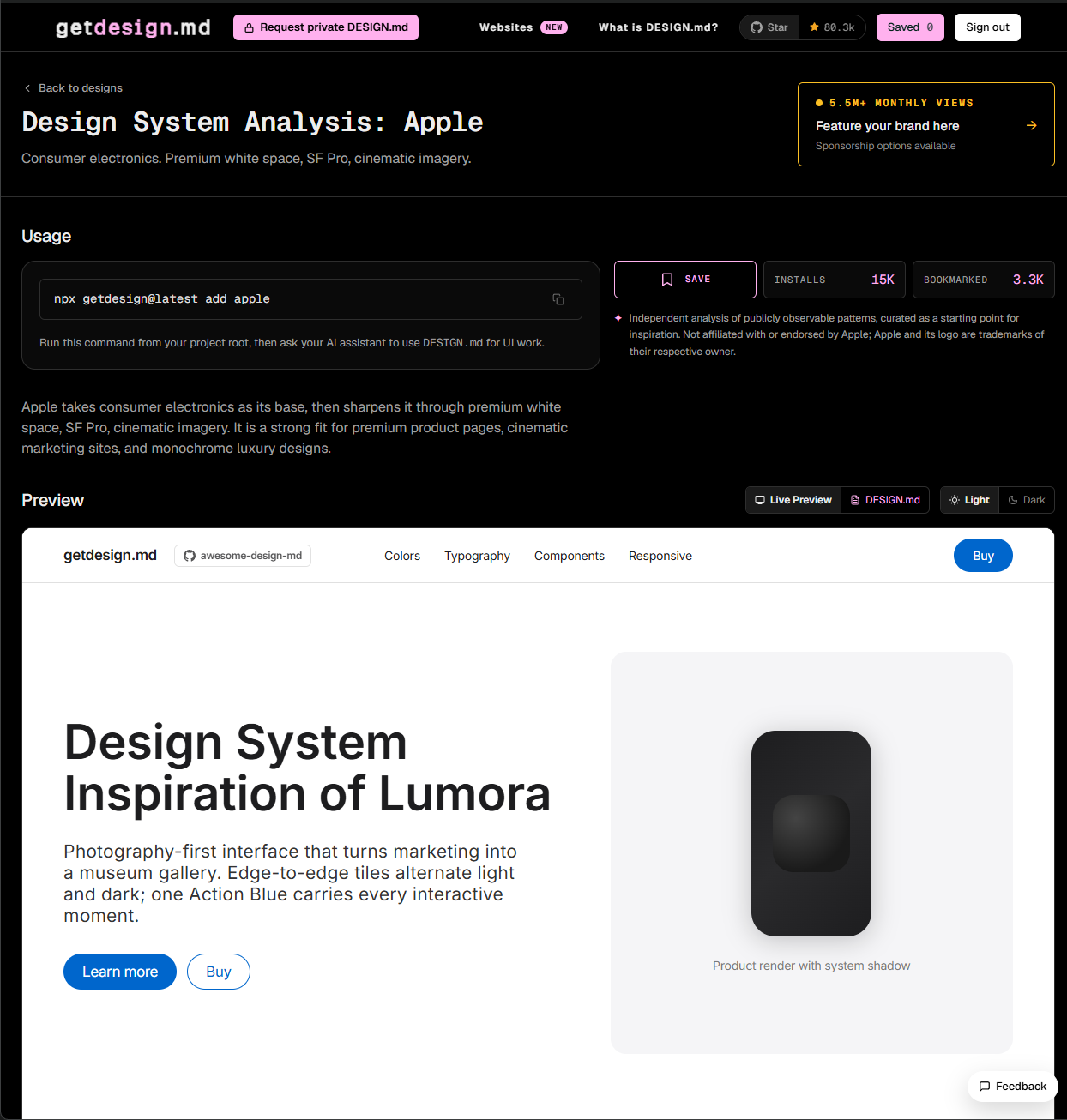
    • Browse getdesign.md and choose a visual reference. Select design system on getdesign.md
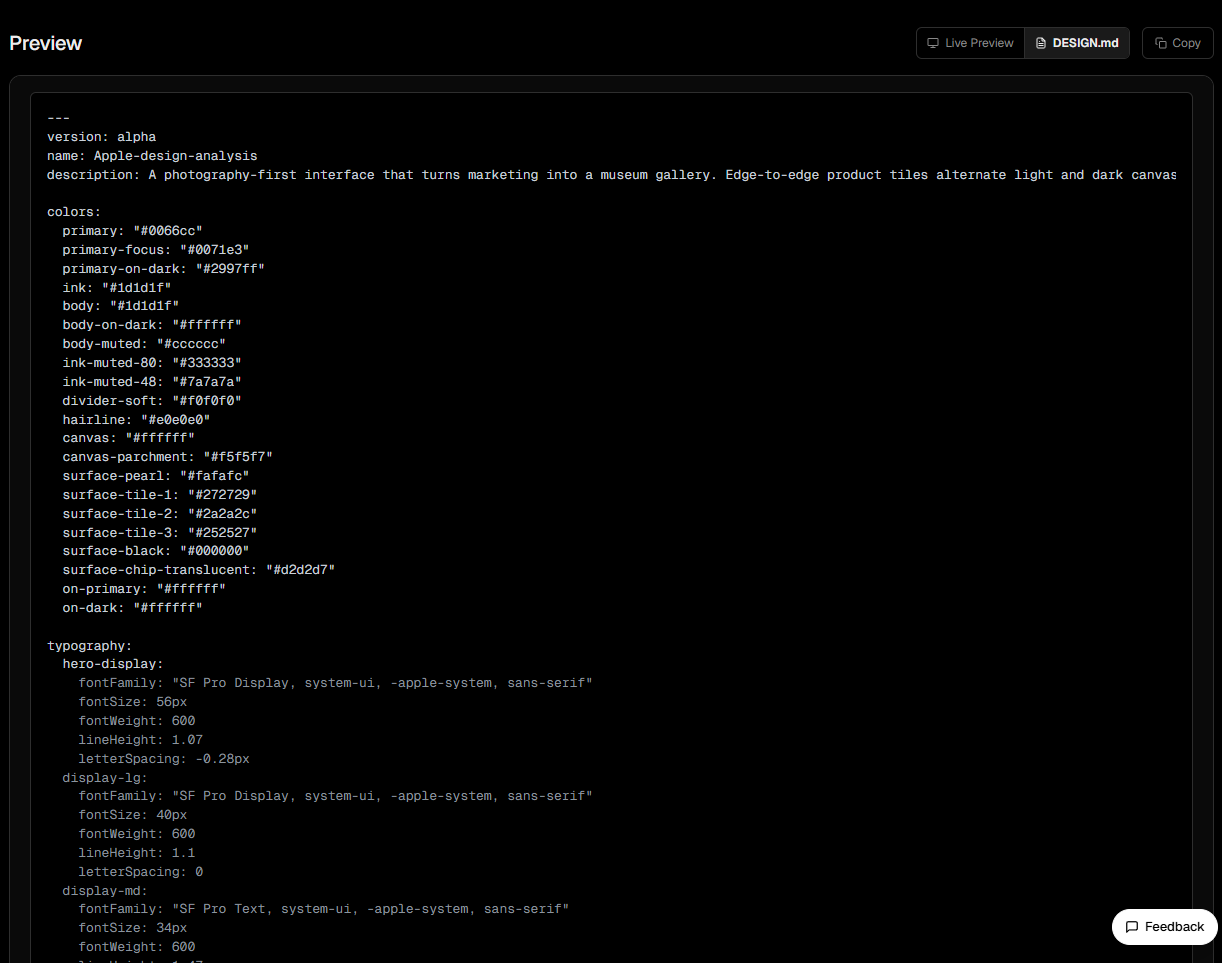
    • Click “DESIGN.md” and copy the entire file content. Copy DESIGN.md
  2. Open Claude Design

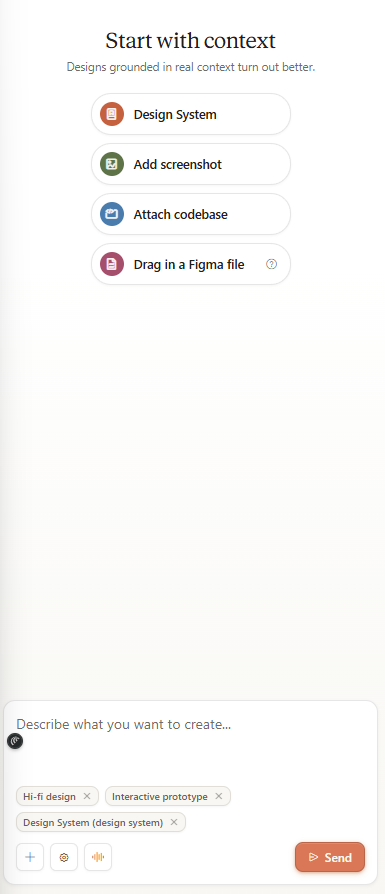
    • Click ”+ Create” to start a new prototype. New prototype in Claude Design
    • Enter a prompt describing the interface to build. For example:

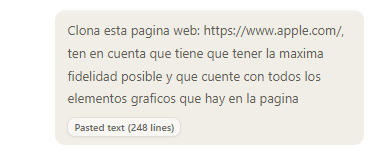
      Clone this website: https://www.apple.com/.
      It must have maximum fidelity and include all graphic elements from the page.
    • Paste the DESIGN.md content as design context. Prototype result
  3. Review the output

    Claude Design generates a prototype that follows the DESIGN.md tokens. If the result is not what you expected, iterate by modifying the file and regenerating.

Why this workflow works

  • Visual consistency — every generated component respects the same palette, typography, and spacing.
  • Fast iteration — edit the DESIGN.md and regenerate without re-explaining the style.
  • No external tools — no Figma, Sketch, or other design tools needed.

Design as code. Tokens as source of truth.

De DESIGN.md a Paginas: Como Generar UI Profesional con Agentes de IA

Un nuevo patron esta emergiendo en la forma en que los desarrolladores construyen UIs con agentes de IA. En lugar de prompts vagos como “haz una landing page que se vea moderna”, se coloca un unico archivo markdown — DESIGN.md — en la raiz del proyecto. Luego se le indica al agente: “construye una pagina que se vea como esto.”

Funciona. A continuacion se explica como.


¿Que es DESIGN.md?

DESIGN.md es un concepto introducido por Google Stitch. Es un documento de sistema de diseno en texto plano que los agentes de IA leen para generar UI consistente. Sin exports de Figma, sin schemas JSON, sin herramientas especiales — solo un archivo markdown.

La relacion es analoga a AGENTS.md pero para diseno:

ArchivoQuien lo leeQue define
AGENTS.mdAgentes de codigoComo construir el proyecto
DESIGN.mdAgentes de diseñoComo debe verse y sentirse el proyecto

Un DESIGN.md contiene:

  • YAML frontmatter — tokens estructurados para colores, tipografia, espaciado, border radius y definiciones de componentes
  • Secciones en prosa — Tema Visual, Paleta de Colores, Reglas Tipograficas, Estilos de Componentes, Principios de Layout, Elevacion, Que Hacer y Que No Hacer
  • Guia de Prompts — prompts listos para usar con cualquier agente de IA

El YAML frontmatter es machine-readable para que un agente lo procese con precision, pero human-readable para edicion directa.

Explore la Coleccion: getdesign.md

getdesign.md es la primera — y mas grande — coleccion de archivos DESIGN.md del ecosistema. Mantenida por el equipo de VoltAgent, actualmente alberga 71+ archivos DESIGN.md que cubren marcas desde Vercel hasta Ferrari.

Obtener un DESIGN.md

Vercel tiene uno de los archivos DESIGN.md mas completos de la coleccion. Para agregarlo a un proyecto:

npx getdesign@latest add vercel

Esto crea DESIGN.md en la raiz del proyecto — un documento de 41KB que contiene todo lo que un agente de IA necesita para renderizar el lenguaje visual de Vercel.

Estructura del YAML frontmatter (truncado):

colors:
  primary: "#171717"
  canvas: "#ffffff"
  canvas-soft: "#fafafa"
  ink: "#171717"
  body: "#4d4d4d"
  link: "#0070f3"

typography:
  display-xl:
    fontFamily: "Geist, Inter, system-ui, sans-serif"
    fontSize: 48px
    fontWeight: 600
    lineHeight: 48px
    letterSpacing: -2.4px

components:
  button-primary:
    backgroundColor: "{colors.primary}"
    textColor: "{colors.on-primary}"
    rounded: "{rounded.pill}"
    typography: "{typography.button-lg}"

La sintaxis de referencia ({colors.primary}, {rounded.pill}) permite la composicion de tokens — cambiar un token una vez se propaga a todos los componentes que lo referencian.

¿Como aplicar el DESIGN.md a Claude Design?

Con el DESIGN.md en mano, el siguiente paso es usarlo dentro de Claude Design. Este flujo permite construir un sistema de diseno que potencia y estandariza el diseño de una pagina por medio de prototipado rapido con IA.

Flujo de trabajo

  1. Elegir un DESIGN.md de referencia

    • Ingresar en getdesign.md y escoger un referente visual. Seleccionar sistema de diseno en getdesign.md

    • Dar click en “DESIGN.md” y copiar todo el contenido del archivo. Copiar DESIGN.md

  2. Abrir Claude Design

    • Dar click en ”+ Create” para generar un nuevo prototipo. Nuevo prototipo en Claude Design

    • Ingresar el prompt indicando cual va a ser la interfaz a construir. Por ejemplo:

      Clona esta pagina web: https://www.apple.com/.
      Tiene que tener la maxima fidelidad posible y contar con todos los elementos graficos de la pagina.
    • Adjuntar el DESIGN.md copiado anteriormente como contexto de diseno. Resultado del prototipo

  3. Revisar el resultado

    Claude Design genera un prototipo que sigue los tokens del DESIGN.md. Si el resultado no es el esperado, se puede iterar modificando el archivo y volviendo a generar.

Ventajas de este flujo

  • Consistencia visual — todos los componentes generados respetan la misma paleta, tipografia y espaciado.
  • Iteracion rapida — se modifica el DESIGN.md y se regenera sin tener que re-explicar el estilo.
  • Sin herramientas externas — no se necesita Figma, Sketch ni ningun otro tool de diseno.

Diseno como codigo. Tokens como fuente de verdad.